


Introduction
Why Choosing the Right Software Is Challenging
With so many options available, beginners often feel overwhelmed and confused when choosing software. Marketing claims, advanced features, and technical jargon can make it hard to decide which tool fits your needs. Picking the wrong software can waste time, money, and effort.
The Role of a Software Review Guide
A software review guide helps readers make informed choices. It explains how to evaluate software honestly, highlights strengths and weaknesses, and provides tips for beginners. With a clear guide, users can confidently select tools that are simple, reliable, and suited to their goals.
Who Benefits from Reading This Guide
This guide is ideal for:
- Beginners: Individuals learning technology for the first time
- Freelancers: People seeking tools to manage projects, clients, or finances
- Small Business Owners: Those looking for software to improve operations, collaboration, and marketing
By following this guide, readers will save time, avoid mistakes, and choose software that truly fits their needs.
Step-by-Step Software Review Process
3.1 Understand the Software’s Purpose
Identify the Problem It Solves
Determine what problem the software is designed to address. Is it for communication, productivity, learning, or creative tasks? Understanding its purpose helps evaluate if it truly meets user needs.
Determine the Target Audience
Identify who the software is for—beginners, students, freelancers, small businesses, or advanced users. This ensures the review focuses on relevant features and usability for the intended users.
Compare to Similar Software
Look at similar tools in the same category. Comparing features, pricing, and ease of use helps readers see how the software stacks up and whether it is the right choice.
3.2 Check Features and Functionality
Core vs. Optional Features
Separate essential features from extras. Core features should work flawlessly, while optional features are bonuses that enhance usability. Highlight which features are most important for beginners.
User Interface and Navigation
Evaluate how intuitive the interface is. Check if menus, buttons, and settings are easy to find and use. A clean and simple layout is crucial for beginner-friendly software.
Device and Platform Compatibility
Check which devices and operating systems the software supports (Windows, Mac, iOS, Android, web-based). Compatibility ensures users can run it on their preferred device without issues.
3.3 Evaluate Ease of Use
Intuitive Design for Beginners
Assess whether beginners can start using the software without extensive training. Look for simple workflows and clear instructions.
Tutorials, Tooltips, and Help Resources
Good beginner software offers built-in guidance like tutorials, tooltips, FAQs, or onboarding tips. Evaluate how accessible and helpful these resources are.
Learning Curve Assessment
Determine how quickly new users can become proficient. A short learning curve is ideal for beginners, while a steep learning curve may require additional resources or practice.
Pros and Cons Analysis
Highlight Both Benefits and Limitations
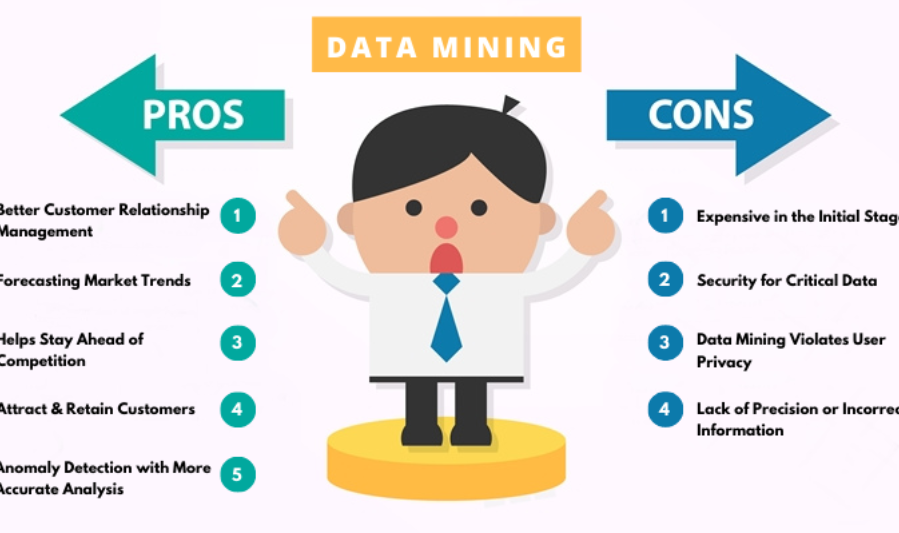
A thorough software review lists both the strengths and weaknesses. Highlighting benefits shows what users can gain, while mentioning limitations ensures readers are aware of potential challenges. This balanced approach builds trust and credibility.
Helps Readers Make Informed Decisions
Pros and cons allow readers to quickly evaluate whether the software fits their needs. Beginners especially benefit from this format because it simplifies complex information into clear, actionable points.
Include Examples of Real Pros and Cons
Providing concrete examples makes the review more practical:
Example:
- Pros: Easy installation, clean interface, free templates for beginners
- Cons: Limited advanced features, occasional slow performance on large files
Real examples help users visualize the software experience and anticipate potential issues.
Comparing Software Alternatives
Feature-by-Feature Comparison
Compare software based on key features that matter to your users. Look at:
- Core functions (essential tools for the task)
- Optional features (extras that enhance usability)
- Ease of use for beginners
This helps readers understand which software offers the features they actually need.
Price Comparison
Highlight differences in pricing, including:
- Free vs. paid versions
- Subscription vs. one-time payment
- Value for money considering features offered
Price comparison helps beginners and small business owners make cost-effective choices.
Best Alternatives for Different User Types
Not every software fits everyone. Recommendations should consider:
- Students: Tools for learning, note-taking, and study organization
- Freelancers: Tools for project management, invoicing, and client communication
- Small Business Owners: Tools for accounting, marketing, and team collaboration
Providing tailored alternatives ensures readers choose software suited to their goals and skill level.
Tools for Beginners vs. Professionals
Clearly differentiate between software designed for beginners and advanced users:
- Beginner-friendly: Simple interface, essential features, tutorials included
- Professional tools: Advanced features, steeper learning curve, more customization options
This helps beginners avoid software that is too complex and ensures professionals get the functionality they need.
How to Spot Fake or Biased Software Reviews
Overly Promotional Language
Beware of reviews that sound like advertisements. Phrases like “best software ever,” “guaranteed results,” or “perfect tool for everyone” are signs the review may be biased. Honest reviews use neutral, factual language and explain both pros and cons.
No Mention of Drawbacks
If a review only lists positive points and ignores any limitations, it may be unreliable. All software has strengths and weaknesses, and honest reviewers provide both.
Lack of Screenshots or Examples
Reviews that don’t show real use—like screenshots, videos, or examples of tasks—are less trustworthy. Genuine reviews include visuals or step-by-step experiences to demonstrate how the software actually works.
Checking Multiple Sources for Validation
Don’t rely on a single review. Compare multiple trusted sources to see if opinions are consistent. Reviews from different websites or user forums help validate whether the software performs as claimed.
Tips for Writing Your Own Software Reviews
Be Honest and Transparent
Always provide a balanced review, listing both pros and cons. Share any affiliations or sponsorships to maintain credibility. Transparency helps readers trust your opinions.
Focus on User Experience
Describe how the software feels in real use. Mention things like ease of navigation, speed, and whether features are intuitive. Focus on the experience from a beginner’s perspective.
Include Screenshots or Examples
Visual aids make your review more practical and easy to understand. Screenshots or examples of tasks show readers exactly what to expect and make your review more convincing.
You may also like to read these posts:
How to Hire Talent: A Step-by-Step Guide for Employers
Top Employee Workplace Trends Shaping the Future of Work
Beginner Workout Plans: A Complete Guide to Start Your Fitness Journey
Breaking Latest Technology News from Around the World
Top Beginner Tech Tutorials for Learning Technology Fast
Use Simple Language for Beginners
Avoid jargon or technical terms that may confuse new users. Explain features in plain, clear language so anyone can understand and follow your review.
Test Software Hands-On
Don’t rely solely on descriptions from other sources. Try the software yourself to get accurate insights into performance, usability, and potential issues. Hands-on testing is the most reliable way to write an honest review.
Faqs:
What is a software review guide?
A software review guide is a step-by-step framework that helps users evaluate software based on features, usability, pricing, performance, and support before making a decision.
Why is it important to follow a software review guide?
Following a guide ensures you make informed decisions, avoid wasting money, and choose software that truly fits your needs and skill level.
How can beginners review software effectively?
Beginners can focus on ease of use, essential features, pricing, and honest user experiences. Testing software hands-on and reading multiple reviews also helps.
How do I spot biased or fake software reviews?
Fake reviews often exaggerate positives, ignore drawbacks, and push readers to buy quickly. Honest reviews include pros, cons, screenshots, and real-world examples.
Should I compare multiple software options before choosing one?
Yes! Comparing alternatives helps you see which software offers the best features, value, and usability for your specific needs.
Conclusion
Choosing the right software doesn’t have to be confusing or time-consuming. By following a structured software review guide, you can evaluate tools based on real factors like usability, features, pricing, performance, and support—rather than marketing promises.
Whether you’re a beginner or an experienced user, using a review guide helps you make confident, informed decisions and avoid costly mistakes. Take the time to compare options, read honest reviews, and select software that truly fits your needs. Smart choices start with the right information


